
How to Login Sindh Job Portal SJP and Complete Your Profile 2026: A Step-by-Step Guide
Are you struggling to access your account or getting stuck at 50% profile completion on the Sindh Job Portal? You aren’t alone. Many candidates miss out on Latest Jobs simply because their profiles weren’t verified or completed correctly. In this guide, we will show you exactly how to login Sindh Job Portal SJP and complete your profile 2026 with 100% accuracy, ensuring your application gets noticed by recruiters.
Quick Overview: SJP Portal Essentials
| Feature | Details |
| Official Website | sjp.gos.pk |
| Required ID | CNIC (without dashes) |
| Profile Completion Goal | 100% (Mandatory for applying) |
| Document Format | PDF or JPEG (Max 1MB) |
How to Login Sindh Job Portal SJP (2026 Updated)
Logging in is the first step toward your government career. Follow these steps to avoid “Invalid Credentials” errors:
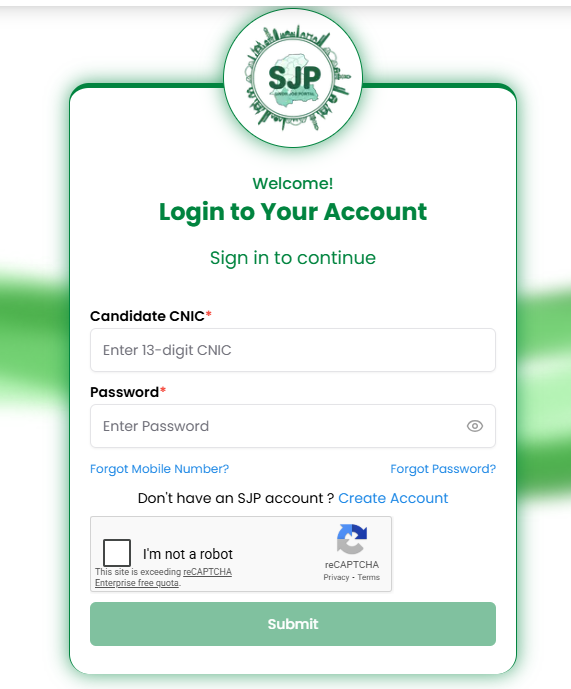
- Visit the Official Link: Go to the SJP homepage.
- Enter CNIC: Type your 13-digit CNIC number. Pro Tip: Do not use dashes or spaces.
- Password Security: Enter your secret password. If you’ve forgotten it, use the “Forgot Password” link to reset it via your registered mobile number.
- OTP Verification: In 2026, SJP has enhanced security. You may receive a 4-digit OTP on your phone; enter it to proceed to your dashboard.
Step-by-Step: Completing Your Profile to 100%
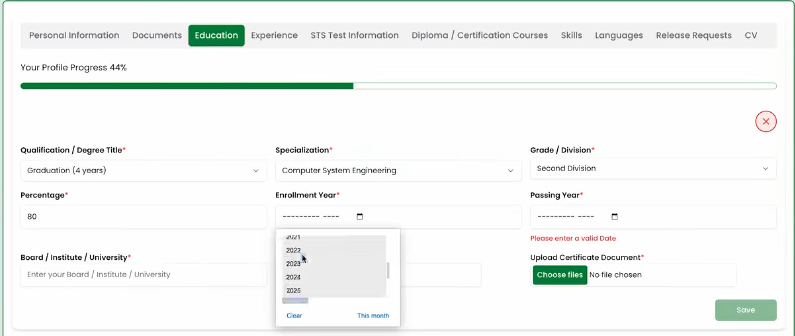
Recruiters often filter out incomplete profiles. To ensure your name appears in the merit list, follow this checklist:
A. Personal Information
Fill in your full name as per your Matric certificate. Ensure your Domicile and PRC details are 100% accurate, as these determine your district quota for Sindh Police or Education department jobs.
B. Educational Record
Start from the highest degree (e.g., Bachelors) down to Matric.
- Missing Degree? If your degree isn’t listed, use our Professional CV Maker to organize your data first so you don’t make mistakes on the portal.
C. Experience & Skills
If you are applying for specialized roles like Driver or Computer Operator, mention your technical skills clearly.
Essential Document Checklist for SJP 2026
Before you hit the “Submit” button, make sure you have uploaded clear scans of the following:
- Passport Size Photo: White or Blue background (Professional attire recommended).
- CNIC: Front and Back copies.
- Academic Transcripts: Matric, Inter, and Graduation.
- Domicile & PRC: Form D is mandatory for Sindh residents.
- Experience Certificates: If applicable.
Pro Tip from Career Counselors: When uploading your picture, wear a formal shirt or your current professional uniform. Avoid selfies or casual filters, as this is your first impression on the department heads. Many candidates are rejected during the “Initial Screening” just because of unprofessional profile photos.
Common Problems & Solutions
- “Website not loading”: The SJP portal gets heavy traffic during Roll No Slips release dates. Try accessing the site late at night or early morning.
- “Profile stuck at 80%”: This usually happens if you haven’t uploaded your Domicile or haven’t added “Skills.” Check every tab for a small red asterisk (*).
Why You Should Complete Your Profile Early
By keeping your profile updated on SJP, you get:
- Instant Notifications: Get alerts for Latest Jobs in your district.
- One-Click Apply: No need to re-upload documents for every new job.
- Faster Processing: Verified profiles get their test slips issued faster.
Frequently Asked Questions (FAQs)
Can I change my Mobile Number after registration?
It is difficult. You may need to contact the SJP helpline or visit their regional office with your original CNIC.
Is it mandatory to upload a CV?
While SJP has its own format, attaching a professional PDF CV helps during the interview stage.
How do I know my profile is 100% complete?
Your dashboard will show a green progress bar at the top indicating “100% Complete.”
Final Action Plan
Don’t wait for the next big advertisement to fix your account. Login to the Sindh Job Portal today, verify your documents, and ensure your contact information is up to date.
